Bulk messaging via WhatsApp for business, using official methods and requirements of Meta Corporation
MultiSend Pro is a professional program for bulk messaging designed specifically for micro and small businesses. It completely automates the delivery of service, transactional, and marketing notifications, allowing you to link your customer databases directly with official messenger gateways. Now you can send messages in a single click without any intermediaries, third-party subscriptions, or hidden charges. Our software is the ideal solution for those who need secure and stable broadcasting in WhatsApp directly through legal Meta Cloud API cloud servers.
If your business requires a reliable tool to run bulk messaging via WhatsApp from Excel, MultiSend Pro offers you unique flexibility. The software features a smart spreadsheet parser and a built-in data cleaner that automatically checks your database, removes duplicates, and populates personal variables (names, dates, balances, order numbers, or individual payment links) for each recipient. All WhatsApp message automation is under your complete control: track delivery and read statuses in real time using live status markers.
The most critical advantage of our product is the built-in local WhatsApp CRM module for PC. The system operates completely autonomously under a secure On-Premise standard: all chat history and incoming conversations are saved strictly locally in an SQLite database on your hard drive, ensuring absolute business confidentiality. Smart analytics tools allow you to export the database of only those customers who replied to you within the last 24 hours in just a single click. This opens a free 24-hour customer service window from Meta, inside which you can run repeated bulk campaigns, send document files, presentations (PDF, DOCX, XLSX), or voice messages in .ogg format absolutely free, spending zero cents of your budget! Forget about complex server configurations and number blocking risks — build communication with your customers efficiently, honestly, and securely.
We significantly simplify the workflow for timely customer notification for companies operating successfully in the following business sectors:
- Insurance Companies — insurance brokers, agencies, and large corporations (comprehensive car insurance, third-party liability, life, and property insurance).
- Travel Companies — travel agencies, tour operators, excursion bureaus, and tour booking services.
- Real Estate Agencies — developers, residential complex builders, real estate agencies, and private realtors.
- Cleaning Companies — professional cleaning services for apartments and offices, furniture eco-cleaning, and window washing.
- Service-Oriented Businesses — repair centers, appliance and electronics repair, legal, accounting, and event agencies, photo studios, and workshops.
- Training Companies and Online Schools — training centers, driving schools, language schools, kids' development centers, and educational platforms (EdTech).
- Online Stores and Retail — marketplaces, boutiques, showrooms, clothing, cosmetics, and electronics stores.
- Auto Services and Repair Shops — car repair shops, tire services, detailing centers, and car washes.
- Medical Clinics — private medical centers, dental clinics, medical laboratories, and diagnostic centers.
- Beauty Salons and SPA — beauty studios, barbershops, spa complexes, and nail salons.
- Hotels and Hospitality — hotels, inns, hostels, guest houses, and apartments.
- Catering Industry and FoodTech — restaurants, cafes, sushi bars, pizzerias, bakeries, coffee shops, and any ready-to-eat food delivery services.
And remember, this is far from the limit! You too can become our customer right now, and you will see from your own experience how easy, fast, and safe it is to inform your target audience, boosting sales and brand loyalty with the professional tools of MultiSend Pro.
MultiSend Pro — Building reliable communication bridges between your brand and customers worldwide. Try it once, and you will forget about bulk messaging problems forever!
Launch ProjectSecurity & Smart Delivery Algorithms
MultiSend Pro is built specifically for official business communication. The program utilizes secure delivery methods, completely eliminating the risk of account suspension.
First Direct Meta Integration
This is the first software on the market to utilize a direct, official integration with the Meta ecosystem and WhatsApp Cloud API. Forget about unstable screen clickers and gray-hat workarounds—this tool implements a legitimate and fully approved interaction method.
Direct Routing via Meta
All your messages are dispatched directly through official Meta servers in strict compliance with the platform's developer policies. This guarantees 100% protection against account bans and messaging restrictions in the WhatsApp system.
Professional Gateways
Modern, secure network protocols are utilized for reliable data exchange. Our software operates as a stable bridge, connecting your system directly to WhatsApp servers without any intermediaries.
Bulk Messaging Software
Perfect for broadcasting service notifications, order confirmations, and authentication codes. Our bulk messaging software via WhatsApp completely automates customer notifications across your current database.
WhatsApp Broadcasting from Excel
Export your full dialogue history into Excel files with automatic column width adjustments. Smart filtering system: export either your entire contact database or only clients who responded. Official WhatsApp broadcasting from Excel is launched in just a single click.
CRM Reports →Scheduled Broadcasts & Planner
The built-in calendar task scheduler allows you to configure automated execution for an exact date and time in the future. The software independently handles timers and launches the project, ensuring your WhatsApp bulk messages are delivered completely autonomously and on time.
Hybrid Text Editor
Full rich text formatting support for WhatsApp. You can highlight text using bold, italics, or monospace code formatting options, embed emoticons via the built-in panel, and import heavy, ready-made text blocks from TXT and Word files.
File & Voice Message Delivery
Complete support for bulk distribution of any business documents, presentations, and images (PDF, DOCX, XLSX, PNG, JPG). The software can also load and dispatch audio recordings in .ogg format as native voice messages within WhatsApp.
Smart Error Capture & Analysis
The intelligent WhatsApp Cloud API error analyzer instantly translates technical server rejection codes into clear, human-readable instructions. The system will guide you immediately if your linked payment card runs out of funds or if an access token was saved with a typo.
Local Data Security
The application is strictly engineered following the secure On-Premise standard. Your full correspondence history, contact names, and secret WhatsApp access tokens are encrypted and saved straight onto your hard drive inside a protected SQLite database, without ever being uploaded to the cloud.
Fixed software cost.
Download from Microsoft Store ✓ Certified by Microsoft: 100% safe & automatic updatesWhy MultiSend Pro is More Profitable Than Cloud Platforms
Transparent Subscription with No Limits
You pay a fixed **$5.99 per month** for the software. Most cloud-based SaaS providers charge between $50 and $120/mo and force you to pay extra for every message package or the size of your contact database.
No "Bloatware" Features for Show
We eliminated overcomplicated corporate tools, AI funnel builders, and heavy cross-analytics that are created by cloud giants solely to inflate the invoice but are **practically never used by small businesses**.
Local Autonomy & High Security
Your Excel client database and messaging history are stored **strictly locally on your PC**, not on third-party cloud servers. A direct connection to Meta guarantees maximum speed and complete confidentiality.
📊 Global Activity Index of WhatsApp Business API Usage (2026)
Official global overview of integration density and commercial traffic volume in the SMB segment according to independent CPaaS market research.
🌐 PART 1: General Questions and Licensing Standards
1.1. What are the terms of the trial period, and what exactly does the software fee cover?
- Free Trial Period: The software provides 7 free calendar days of a fully functional evaluation period starting from the moment the application is downloaded from the official Microsoft Store. This allows you to completely deploy the system and test its capabilities before making a purchase.
- What the fee covers: The subscription fee of $5.99 per month is charged by the built-in Microsoft Store Commerce system solely for the right to use the graphical user interface (the integration bridge). This fee covers automatic software updates for new Windows versions, the operation of the built-in CRM module, the intuitive template constructor, the Excel database parser, and the built-in syntax error validator. This cost does not include message traffic charges, which you pay directly to the Meta platform.
1.2. What is WhatsApp Business API, and what are its international standards?
- Official Communication Standard: WhatsApp Business API (WABA / Meta Cloud API) is an official, fully legitimate, and Meta-approved global standard for business and corporate communication.
- Cloud Architecture: Unlike the standard WhatsApp mobile application, the business version operates directly through Meta's secure cloud servers rather than a physical smartphone. The channel is protected by end-to-end encryption, operates autonomously, does not depend on your phone's status or home internet quality, and provides the highest level of corporate number security guaranteed by Facebook regulations, as all delivery follows approved white-hat protocols.
1.3. On which official website is the Meta Business API registered?
- Developer Portal: Registration, creating an official WhatsApp Business Account (WABA), linking your business phone numbers, and company verification are managed strictly on the official Meta for Developers portal at the direct address: https://developers.facebook.com/.
1.4. On what principle and in what order does Meta charge for messaging?
- 24-Hour Session Charges: The Meta platform does not charge per individual message sent, but rather for initiating a conversation with a specific client, opening a fixed 24-hour customer service window. The session cost is fixed and depends on the recipient's country and the selected text category (Marketing, Utility, Authentication, Service).
- Financial Control: All deductions are made directly from the credit or debit card that you personally link in the secure "Billing & Payments" section inside your Facebook Business Manager. The developer of MultiSend Pro has no access to these funds and charges no additional transaction fees.
- Monthly Free Tier Limit: Every month, Meta provides your business account with 1,000 conversation sessions absolutely free of charge. One session equals 24 hours of unlimited messaging with a single client from the moment the first message is sent or received. Thanks to this free tier, official API usage often ends up being completely free for small businesses.
1.5. What is the key difference between MultiSend Pro and third-party browser automation software?
- Official and Reliable Communication Channel: Many third-party programs and extensions operate by gray-hat automation methods that mimic human clicks on a screen (clicker scripts) via a standard web browser interface. Such methods severely violate WhatsApp's international terms of service, leading to immediate, permanent number bans. Furthermore, they require a constantly active PC to keep the browser session alive.
- Stable Batch Delivery: The MultiSend Pro application functions as a direct, official software bridge interacting with Meta Cloud API servers. The program communicates with the server via encrypted data packages. Meta handles the distribution and guarantees message delivery to the user devices. This ensures uninterrupted delivery of your utility and marketing messages without being tied to a browser status, guaranteeing the highest level of security, brand authority, and corporate connection stability.
🔒 PART 2: Security
2.1. Where and in what format are secret access keys (Token, Phone ID, WABA ID) stored?
- Local Encrypted Storage: All your secret access tokens, Phone IDs, and WABA IDs are written to a special configuration settings file strictly locally on your personal computer. The file is completely isolated inside a protected system directory.
- Absolute Confidentiality: The architecture of the program is designed according to the On-Premise (local execution) standard. This means your sensitive authorization data is strictly never transmitted to third-party cloud resources, developer servers, or any external entities. The program utilizes these keys exclusively to establish direct encrypted requests to the Meta Cloud API gateway at the moment of launching a broadcast or managing CRM workflows.
2.2. Where is payment card data stored?
- Complete Isolation of Payments: The program has absolutely no access to, nor does it request or store, your bank card details. The card used for message traffic is linked directly inside your secure Facebook Business Manager account, while the monthly software subscription billing goes through the official security protocols of the Microsoft Store. All financial transactions for session delivery are processed directly on Meta (Facebook) servers via integrated international payment gateways, completely excluding any third-party software involvement.
2.3. Where is the CRM chat history stored?
- Local Logs: Your entire incoming and outgoing message log, contact names, and dialogue delivery statuses are saved within a local database file on your physical hard drive.
2.4. What is the advantage of local storage over cloud-based systems?
- Absolute Confidentiality (On-Premise): Unlike cloud SaaS platforms (where your Excel client databases, tokens, and commercial correspondence reside on external third-party servers and risk being leaked, stolen, or blocked for non-payment of expensive tariffs), MultiSend Pro leaves full ownership of the customer database and chat history with you. Neither the software developer nor any third party has access to it. While cloud services charge $100/mo just for database hosting, here you pay $5.99 solely for the tool itself, maintaining personal control over your business data.
🌐 PART 3: Access Token, Phone Number ID, and WABA ID
3.1. What are the Access Token, Phone Number ID, and WABA ID in Meta API settings?
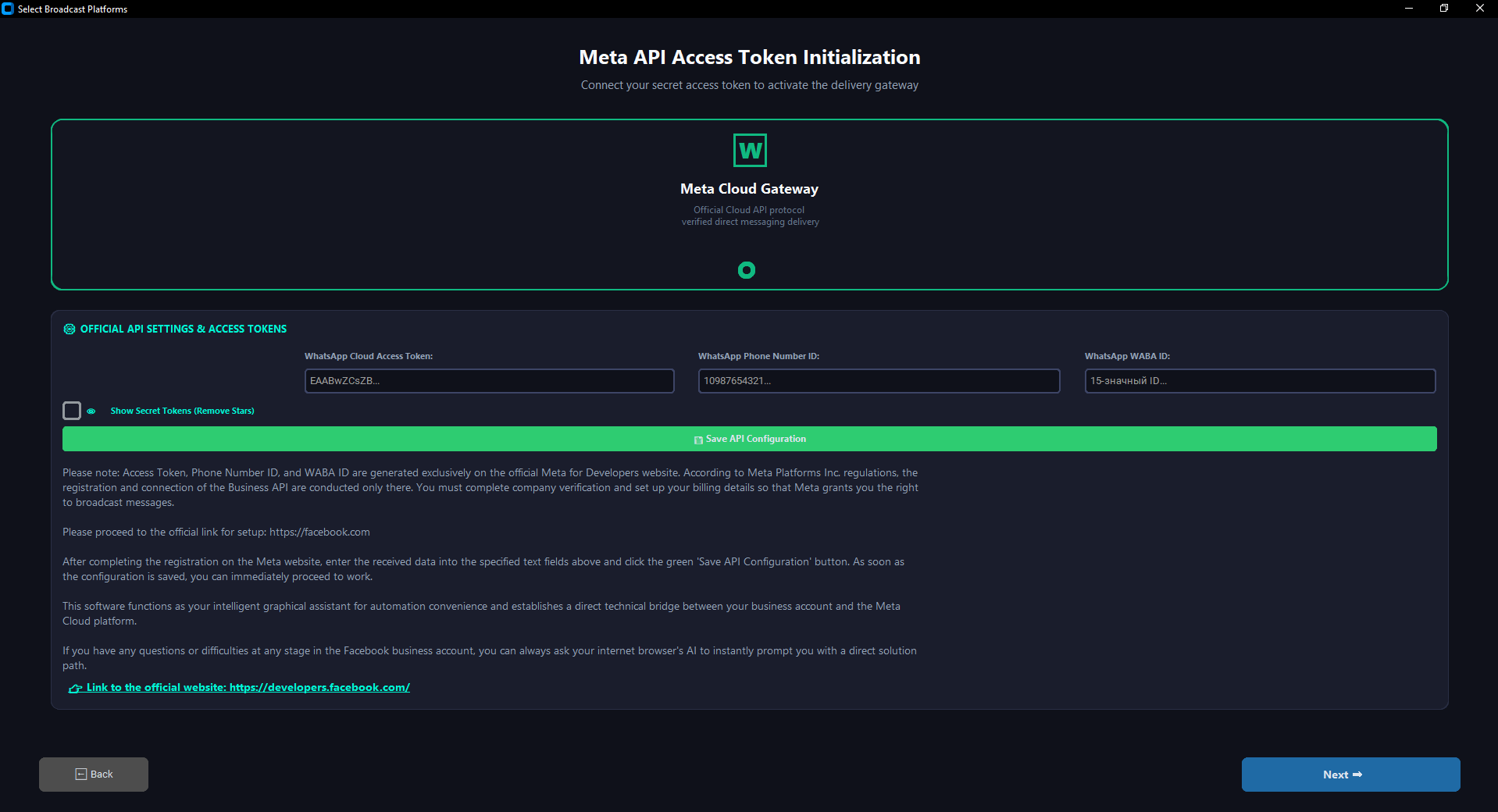
- WhatsApp Cloud Access Token: This is your unique, secure digital security key generated by the official Meta for Developers platform. It serves as a digital signature that authorizes MultiSend Pro to dispatch data packages on behalf of your business account.
- WhatsApp Phone Number ID: A unique 15-digit system identifier that Meta automatically assigns to your business phone number within the dashboard. It is required so that the cloud gateway knows exactly which connected number should execute the current broadcast.
- WhatsApp WABA ID (WhatsApp Business Account ID): A global unique identifier for your WhatsApp Business Account. It links the software to your Facebook Business Suite panel and is required to synchronize, retrieve, and manage your official templates (Marketing and Utility).
3.2. Where and how can I get the Access Token, Phone Number ID, and WABA ID?
- Official Developer Portal: All three identifiers are generated completely free of charge inside your personal account on the official Meta for Developers website. To do this, log in at: https://developers.facebook.com/.
- Step-by-Step Generation Path: Inside the dashboard, navigate to the WhatsApp settings section, connect your working phone number to the cloud gateway, complete your company verification, and set up a payment method for Meta. Immediately after this, the system will automatically generate your permanent 15-digit Phone Number ID, WABA ID, and secret Access Token. You just need to copy these credentials and save them once on the settings screen inside MultiSend Pro.
3.3. Where do I need to enter the Access Token, Phone Number ID, and WABA ID in the program, and how do I save them?
- Key Initialization Screen: All retrieved credentials must be pasted into the designated secure text fields on the API Settings screen. For convenient input and typo checking, you can toggle the "Show secret tokens (Remove asterisks)" checkbox—this will temporarily unmask the characters.
- Saving Procedure: Once all three fields are filled, click the green "Save API Keys Configuration" button. The program will automatically record these parameters into an encrypted settings file on your computer. This entry is performed only once—upon subsequent launches, MultiSend Pro will fetch your keys automatically.
⚙️ PART 4: Message Template Management
4.1. What is a WhatsApp message template, and why is it required?
- Official Meta API Regulations: A message template is a pre-formatted text layout that must pass mandatory automated review by Facebook's moderation algorithms. According to international Meta Cloud API rules, a business cannot initiate a dialogue with a customer (write first) in an arbitrary free-form text. Any initial informative or service campaign is strictly required to begin with an approved template.
- Template Categories and Types: In the Meta API system, there are three official categories: UTILITY (Service messages: order notifications, reminders, account statements), MARKETING (Advertising and sales: promotional broadcasts, discounts, holiday offers), and AUTHENTICATION (Access codes: one-time passwords for secure authorization).
- Official Tariffs and Billing: Message delivery charges for initiating templates are deducted directly from your balance inside Facebook Business Manager. At the same time, service messages (UTILITY) and access codes (AUTHENTICATION) are billed by the Meta platform at significantly lower technical rates compared to the MARKETING category.
4.2. How do I create an official template, and what is a variable tag like {{X}}?
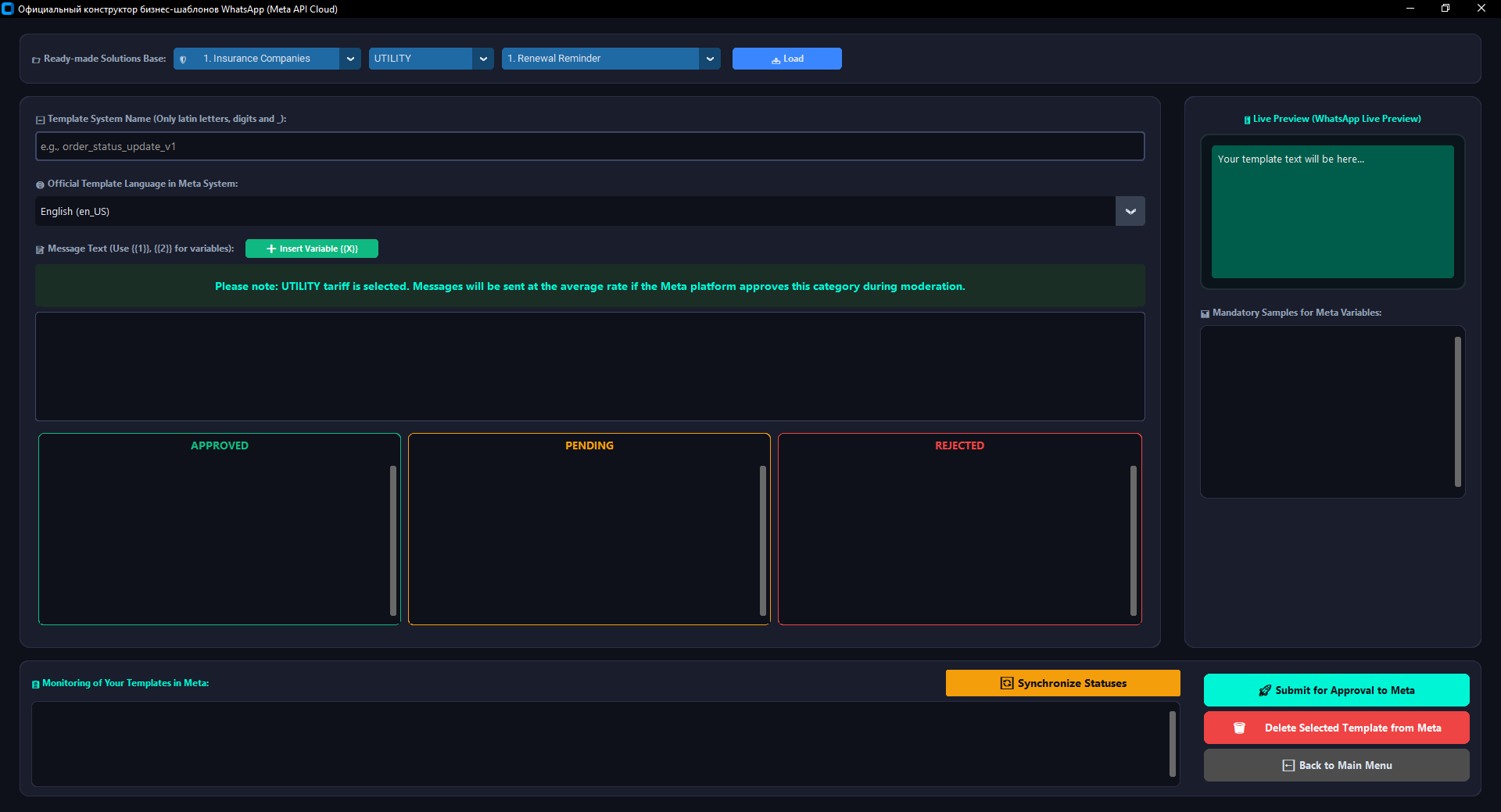
- Creation Process in the Constructor: Creating and submitting text layouts for moderation is performed on the Templates Page. You must specify a unique system name using lowercase Latin letters and underscores (e.g., tmpl_order_status_v1), choose the official language of the message, and input the body text.
- What is a variable tag {{X}}: A variable (formatted as {{1}}, {{2}}, etc.) is a special digital macro placeholder. Instead of these markers, MultiSend Pro automatically injects personalized data for each individual customer from your imported Excel spreadsheet (e.g., recipient's name, unique login credentials, appointment date, or outstanding balance) during a "Smart Broadcast" launch.
- Mandatory Meta Validation Rule: According to strict Facebook platform regulations, when creating a template, you must provide mandatory example values (Samples) for absolutely every digital macro tag {{X}} used. These fields must illustrate the actual data type (text, number, or date) that will be processed during delivery. If you leave the example fields blank or specify an incorrect data type, Meta servers will automatically reject your layout at the review stage.
4.3. What are the limitations on the maximum text length in a business template?
- Official Meta Platform Limit: According to strict Meta Cloud API technical specifications, the maximum size of the main text block (BODY component) is strictly limited to 1,024 characters, including spaces, punctuation marks, and emojis.
- Character Rule for Variables: Please note that when using digital placeholder macros (e.g., {{1}}, {{2}}), Meta algorithms calculate the total message length based on the actual data pulled from Excel. If your base template text is already close to the 1,024-character limit and long text descriptions are loaded from the spreadsheet variables, the Meta server will automatically block the dispatch of such a row due to a limit violation. When composing templates, always leave a buffer of 150–200 characters to ensure safe insertion of personalized client data.
4.4. How do I choose the correct billing category for a business template?
- Category Selection upon Creation: The message tariff tier is determined at the moment of template creation via the dropdown menu where you select the official business category (UTILITY or MARKETING).
- Automated Financial Control: MultiSend Pro features an integrated intelligent financial monitoring module. As soon as you switch a category or select a ready-made template from your library, the application displays a special color-coded warning alert in real time. The program instantly informs you of Meta's current tariff conditions for the selected text layout type, protecting your advertising budget from unexpected overcharges.
- Meta's Automated Recategorization Rule: Please note that the final billing tier decision is always made by Facebook's moderation algorithms. If you select the lower UTILITY service tariff but include advertising content, promo codes, or sales pitches in the message text, Meta servers will automatically reclassify your layout into the MARKETING category at the maximum billing rate. To save budget, always separate marketing and service campaigns.
4.5. Can Meta independently change the category and tariff of an approved template?
- Automated Recategorization by Facebook Algorithms: Yes, this happens regularly. If you submit a layout under the UTILITY service category but Meta's algorithms detect promotional material, discount codes, coupons, or purchasing incentives within the text, the system will automatically reassign your layout to the MARKETING category.
- Live Monitoring inside the Software Interface: You do not need to log into your Facebook account to track these updates. MultiSend Pro reads actual statuses and tariff grids in real time directly from Meta API servers. The moment a template's category is modified on Facebook's side, the application immediately updates the color-coded financial control alert on your screen, protecting you from unpredicted expenses when launching a broadcast.
4.6. How can I see the full list of my templates in the program and find out their status?
- Interactive Monitoring Zones: Within the "Template Constructor" interface, your workspace is split into three convenient visual control zones: APPROVED (green), PENDING (under consideration), and REJECTED (declined by moderators).
- Instant Synchronization: Upon clicking the prominent "Synchronize Statuses" button, MultiSend Pro dispatches a secure automated request directly to your Facebook business profile. The application instantly retrieves your full decision history and displays interactive lists of layout names directly in these three zones. You can click on any template name in the list to immediately review its full text string and evaluation card in the lower monitoring pane.
4.7. Which templates can be deleted from the system, and how do I execute this procedure correctly?
- Official Meta API Regulations and Constraints: According to international Meta Cloud API rules, you have the full legal right to permanently delete any message layouts from your business profile that are currently in APPROVED or REJECTED statuses. If a template has a PENDING status (is currently undergoing active verification by moderators), its deletion is temporarily locked by Meta's core architecture until the review is finalized.
- Step-by-Step Safe Deletion Workflow: To protect your active workflows and eliminate accidental clicks, MultiSend Pro implements a two-stage interactive safety mechanism: first you synchronize statuses, then click on the required layout name in any control zone, and finally press the red "Delete Selected Template from Meta" button. The application sends a protected network command to your Facebook dashboard, permanently wiping the chosen language version from the cloud, and updates the tables on your screen automatically.
4.8. Who approves business message templates in WhatsApp, and how long does moderation take?
- Review Process on Facebook's Side: All text layouts submitted by you undergo mandatory automated verification handled by specialized neural networks and dedicated staff at Meta Platforms Inc.
- Standard Review Timelines: In the vast majority of cases, Meta's algorithms approve the layouts very rapidly—moderation takes from 1 minute up to 2–3 hours. However, in rare or complex cases (such as verifying intricate medical, financial, or legal texts), the evaluation procedure can officially extend up to 24 hours. MultiSend Pro allows you to monitor this progress in real time directly on your device.
4.9. How do I correctly create a template for delivering one-time access codes (Authentication)?
- Official Meta Security Regulations: According to international security policies established by Meta Platforms Inc., the generation of layouts under the AUTHENTICATION category (for dispatching confirmation codes, passwords, and one-time OTP keys) must be performed strictly inside your official Facebook Business Suite dashboard. For user data protection reasons, Meta prohibits generating such systemic templates through external third-party API interfaces.
- Integration and Block Mechanisms in the Software: To protect your business profile from structural errors, MultiSend Pro includes an automated interface lock: when toggling the category selector to the AUTHENTICATION tier, the green submission button freezes and displays a lock icon.
- Workflow for Access Passwords: To launch an OTP code dispatch, execute two simple steps: generate the authentication template layout on the https://developers.facebook.com/ dashboard, and then return to MultiSend Pro and click "Synchronize Statuses". The program will instantly fetch the layout approved in Facebook, display it under your APPROVED list matching Meta's lowest technical rate, and you can immediately initiate passcode broadcasts across your database.
4.10. Why does Meta require initiating dialogues with customers exclusively using approved business templates?
- Global User Protection Policy: This requirement is a cornerstone of Meta Platforms Inc.'s global policy aimed at protecting messenger users from receiving unsolicited, irrelevant, or spam information.
- Preliminary Content Control: By executing mandatory automated validation of text layouts upon entry, Meta ensures that messages dispatched by businesses fully comply with the official WhatsApp Commerce Policy guidelines. The text strings must not contain hidden safety threats, abusive language, or prohibited content.
- Elevating Brand Authority: Due to this compliant approach, customers open and read official business messages in WhatsApp much more willingly compared to traditional SMS or emails. The global average open rate for official business templates reaches a record-breaking 98%, making this communication channel highly effective for driving your business goals and customer engagement.
📊 PART 5: Smart Excel Broadcasting, Scheduler, and Reports
5.1. How do I import a contact database from Excel into the program?
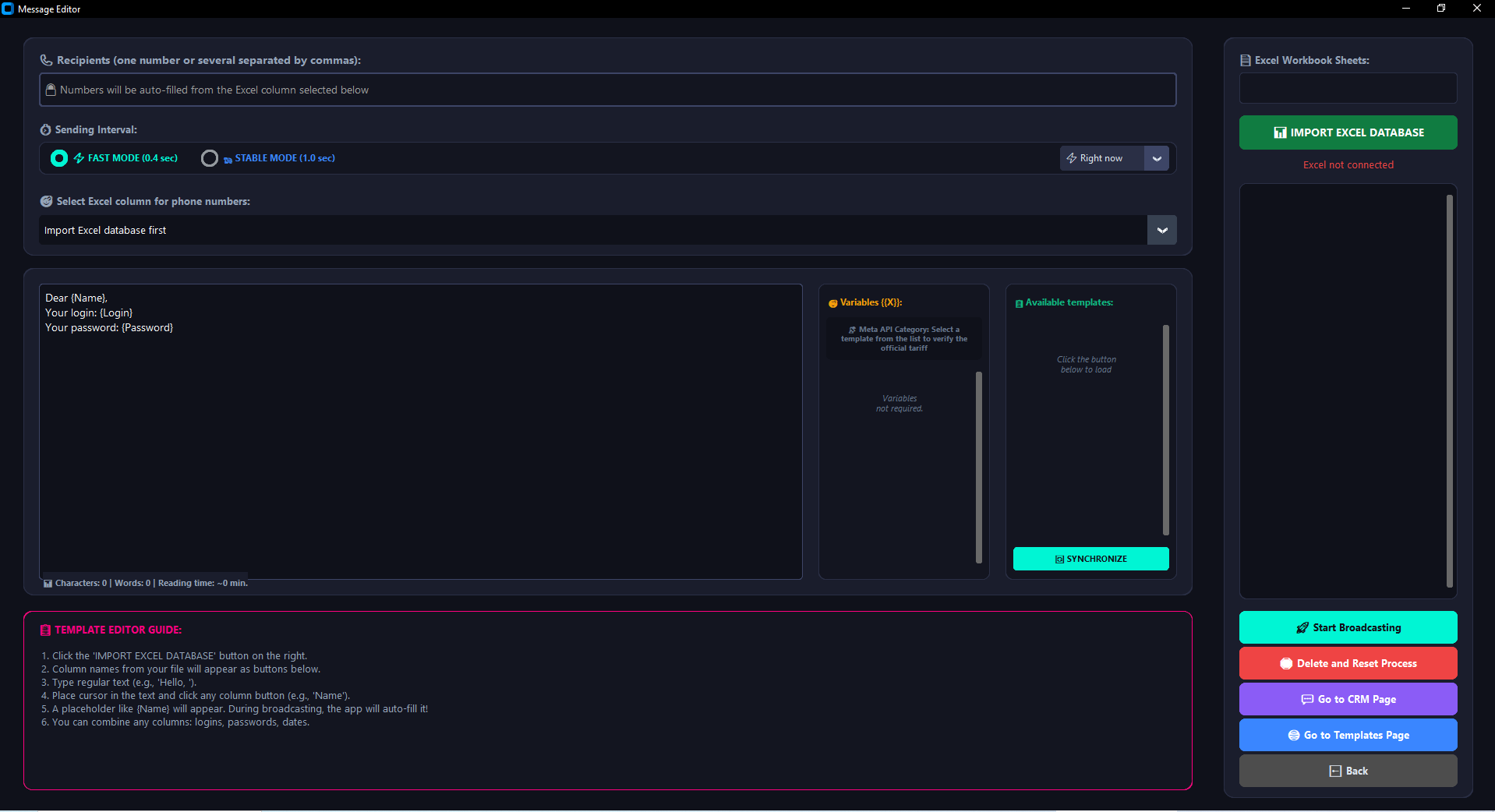
- Spreadsheet Import Procedure: On the right control panel within the "Smart Broadcast" interface, click the green "IMPORT EXCEL DATABASE" button and select the target file from your local storage. The program instantly parses the document architecture, displays the total number of detected rows on your screen, and generates clickable macro buttons for workflow automation.
5.2. What data format and table structure are required for correct database operations?
- File Structure Specifications: The document must be a standard Excel spreadsheet (supported extensions include .xlsx, .xls, or .xlsm). The first row of the sheet must strictly contain clear textual column headers (e.g., Phone, Name, Order_ID, Payment_Link). The application will process these headers as structural variable tags for dynamic text generation.
5.3. Are there any restrictions on the number of phone numbers inside an imported database?
- Technical and Platform Limits: On the part of MultiSend Pro's architecture, there are absolutely no technical limits—the recipient pool processed within a single session can range from 1 single row up to 10,000+ entries. However, daily limits on outgoing message volume (e.g., 250, 1,000, 10,000, or unlimited messages per day) are enforced directly by Meta API regulations and rely entirely on your current verification status and quality rating inside Facebook Business Manager.
5.4. What digital standard must phone numbers inside the Excel file comply with?
- Input Format Standards and Auto-Cleaning: Phone numbers must correspond to the international numerical format standard (e.g., 14155552671 or 994501112233). MultiSend Pro features an integrated intelligent formatting data cleaner. When parsing a spreadsheet, it automatically strips away all unnecessary symbols (plus signs, spaces, parentheses, dashes) and auto-corrects local prefixes to global dialing standards.
5.5. Is it possible to launch an official business template broadcast by entering a single phone number manually without uploading an Excel file?
- Automation Module Core Principle: No. The Meta API "Smart Broadcast" constructor is strictly engineered based on programmatic cross-matching between template macro placeholder tags and spreadsheet column headers. Therefore, importing an Excel database is a strict prerequisite for executing official template broadcasts, even if your file contains only a single row with one customer context. For delivering single free-form messages manually, utilize the CRM Chat module.
5.6. How do I specify to the program which exact column contains the phone numbers after importing the file?
- Binding the Recipient Column: Immediately following a successful file import, navigate to the selection menu on the left pane: "🎯 Specify the Excel column containing recipient phone numbers". Choose the specific column title where your mobile data is recorded (e.g., Phone or Mobile_No) from the dynamic dropdown list.
5.7. Which specific business templates are displayed in the selection menu of active solutions for a broadcast?
- Traffic Security Controls: The "Smart Broadcast" launch menu fetches and lists only those layouts that have successfully passed verification on Meta's servers and possess an official green APPROVED status. Layouts currently under active validation or rejected by Meta's reviewers are completely filtered out by the program interface to safeguard your corporate account standing.
5.8. How can I review the current status and internal parameters of a layout loaded into the broadcast menu?
- Parameter Visual Indications: All active layouts available in the dropdown are verified. Clicking on any layout name inside the central control pane instantly maps its parameters, listing its personal dynamic variable targets {{1}}, {{2}} in real time, while the upper dashboard pane mirrors the officially bound Meta tariff rate (Utility or Marketing).
5.9. What data strings can be transmitted within variables, and which ones are strictly prohibited?
- Allowed: Injected fields can securely handle customer names, order SKUs, unique system logins, numerical account balance records, reservation calendars, and custom payment links.
- Prohibited: The actual data type in your Excel cells must strictly match the sample layout format (Sample) previously verified by Facebook. If you mapped a short numerical integer inside the Sample configuration, but input three lines of long promotional descriptions inside the spreadsheet cell—Meta servers will immediately drop delivery for that data package. Additionally, text rows nested inside variable cells must not contain manual line break return formatting tags.
5.10. What is the fundamental operational difference between the "Fast" and "Stable" broadcast launch modes?
- Fast Mode: The technical processing interval between delivery requests is set to exactly 0.4 seconds. This tier is highly recommended when executing broadcasts on high-performance computers backed by high-speed, stable network connections.
- Stable Mode: The safe processing delivery loop interval is set to 1.0 second. This configuration serves as a universal standard engineered for mitigating latency during massive database broad-scale campaigns.
5.11. How do I configure the automation module to launch a broadcast campaign at a specific time in the future?
- Integrated Campaign Scheduler Configuration: Within the interactive calendar widget, toggle the scheduling profile selector from "Execute Immediately" to "Set Target Date & Time". Map your desired delivery timeline in the configuration panel, specify your clock targets, and activate the session. The button will shift to a real-time countdown tracking state. Strict automation prerequisite: at the designated deadline, your PC must remain powered on, backed by an active internet connection, with the MultiSend Pro process actively running.
5.12. Is it possible to pause a running broadcast campaign or completely cancel an active session workflow?
- Real-Time Campaign Stream Controls: Yes, stream management is completely interactive. The primary central action button serves as a live toggle switch: clicking it mid-delivery transitions the stream immediately to a Paused state (freezing row progress and enabling seamless resumption from that exact spot later). The adjacent red button completely terminates and drops the current active campaign state, resetting data streams and resetting row pointers back to position 1.
5.13. How do I export a campaign delivery report, and what file format does it utilize for logging results?
- Exporting Professional Logs: Upon pausing or fully completing a messaging campaign, the system log output pane dynamically renders a large green "📥 Save Detailed Campaign Report..." button. Clicking it fires a native Windows save dialogue box, enabling you to select any folder on your hard drive. The spreadsheet logs are compiled into a beautifully structured Excel sheet (.xlsx) rendered in the application's clean brand color assets. The file features automatic column scaling, sanitized message strings matching individual rows, a timestamp column specifying the exact dispatch execution time, status logs, and official unique delivery tracking codes (wamid attributes) generated straight by Meta servers.
💬 PART 6: Built-in CRM Module and Incoming Chat Management
6.1. Will the CRM module receive messages from clients if my computer or the program is turned off?
- 24/7 Automated Message Reception: Yes, 100%. This is a key architectural benefit of the official Meta Cloud API. Since your business phone number is linked directly to Facebook servers, all incoming client messages accumulate in cloud storage continuously. As soon as you power on your PC and launch MultiSend Pro, the integrated networking module polls your server, instantly retrieves all dialogues missed during your absence, and saves them into the application's local database.
6.2. How do I export the database of clients who responded within the last 24 hours, and why is this necessary?
- Active Contact Export Procedure: On the CRM tools sidebar pane, click the "⚙️" (Settings) icon, and select the "🔥 Only those who responded within the last 24 hours" option in the modal pop-up. The program generates and exports a structured Excel table to your Desktop containing phone numbers of clients active over the past day.
- Marketing Business Value: According to Meta regulations, a client's response opens a 24-hour free customer service window. Exporting this list gives you a hot lead base for executing follow-up upsales. Import this file into the program's "📝 Free Mode" and trigger bulk campaigns with special offers or attachments. Such broadcasts are delivered completely free without official templates—Meta won't bill a single cent.
6.3. Where on the computer is the CRM chat correspondence history physically located?
- Secure Local Storage Asset: Your full incoming/outgoing messaging history, including delivery log statuses, is written strictly to your local hard drive. The core database file resides within an isolated system directory matching the following path: AppData\Roaming\MultiSendPro\history.db.
6.4. Who has access to my corporate correspondence and CRM chat data streams?
- Absolute Data Confidentiality: Chat history data streams can be accessed strictly by you and the administrators permitted onto that specific workstation. Because MultiSend Pro uses a local execution infrastructure (On-Premise), the database file remains physically on your machine. No intermediary cloud server possesses access to your message copies or customer information.
6.5. Is it possible to completely wipe the chat log history for a specific conversation inside the CRM?
- Managing Local Database Erasure: Yes. Inside the open chat window heading area on the right, there is a dedicated trash bin icon 🗑️. Clicking it fires an official confirmation modal. Once authorized, MultiSend Pro flushes the local SQLite database assets, permanently wiping all message text blocks and activity logs for that recipient.
📎 PART 7: Free Mode (Compose Custom Message) and Media Attachment Management
7.1. What tasks is the "Compose Custom Message" section (Free Mode) designed for?
- Tool for Zero-Cost Communication Flows: This tab is engineered for managing agile info streams, repetitive sales pitches, and bulk conversations with a pre-warmed client base. In this layout, you can compose free-form copies, utilize rich text formatting attributes, embed emoticons, and attach media elements completely bypassing Meta's template validation rules.
7.2. For how long does a free-form conversation window remain active, and how do Meta's constraints apply?
- Standard Window (24 Hours): If a user initiates a dialogue with your corporate line (via your website, card directory, etc.), Meta unlocks a 24-hour cost-free customer session block. Inside this window, you can deliver any custom copy strings or files with zero financial constraints or billing charges.
- Extended Advertising Window (72 Hours): If you link your business WhatsApp line with official Facebook or Instagram ad assets and trigger paid "Click-to-WhatsApp" campaigns, the first interaction automatically unlocks a 72-hour (3-day) completely free and unrestricted communication loop.
7.3. Does the application support bulk distribution of images, audio tracks, and business documentation files?
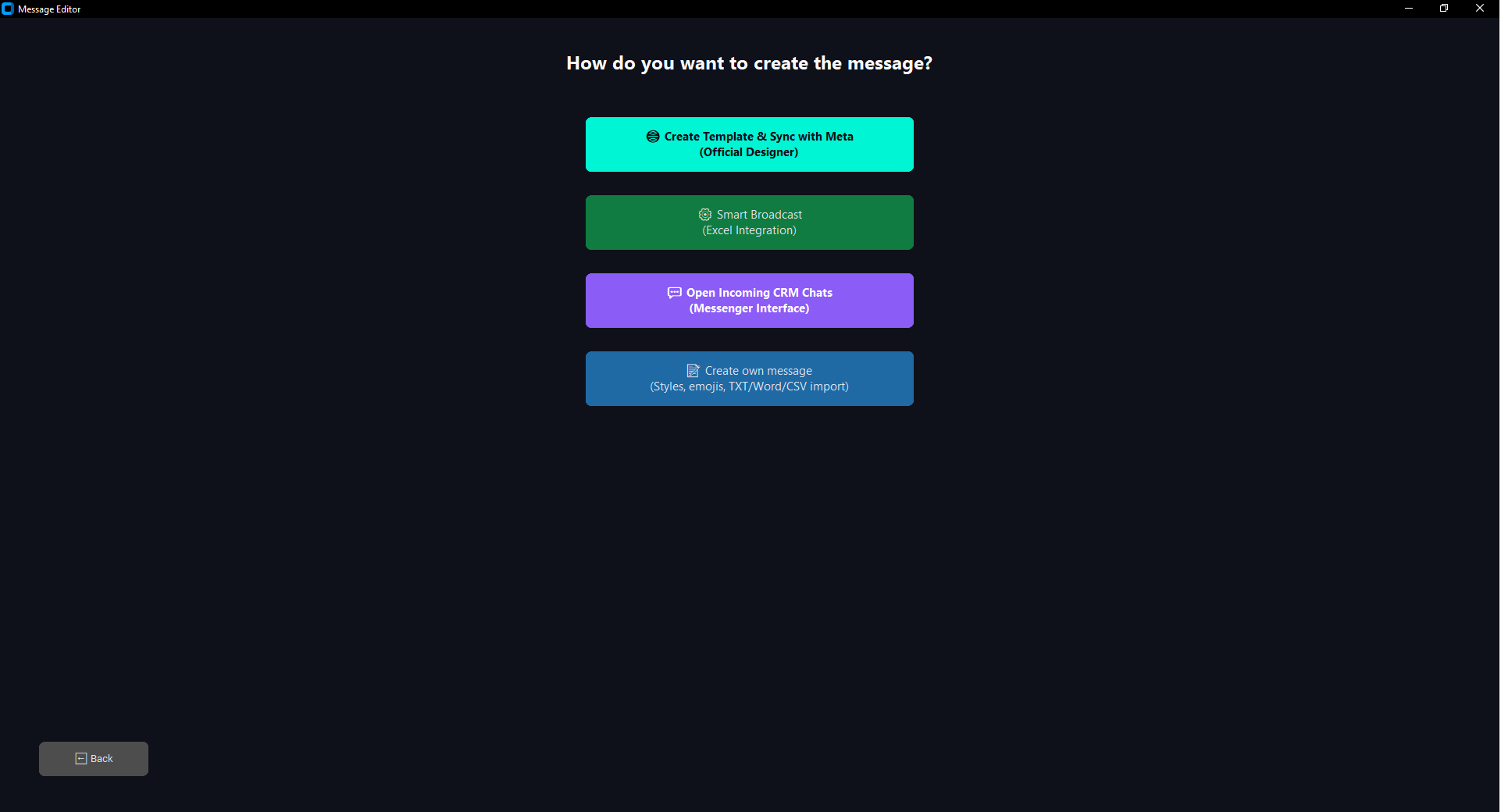
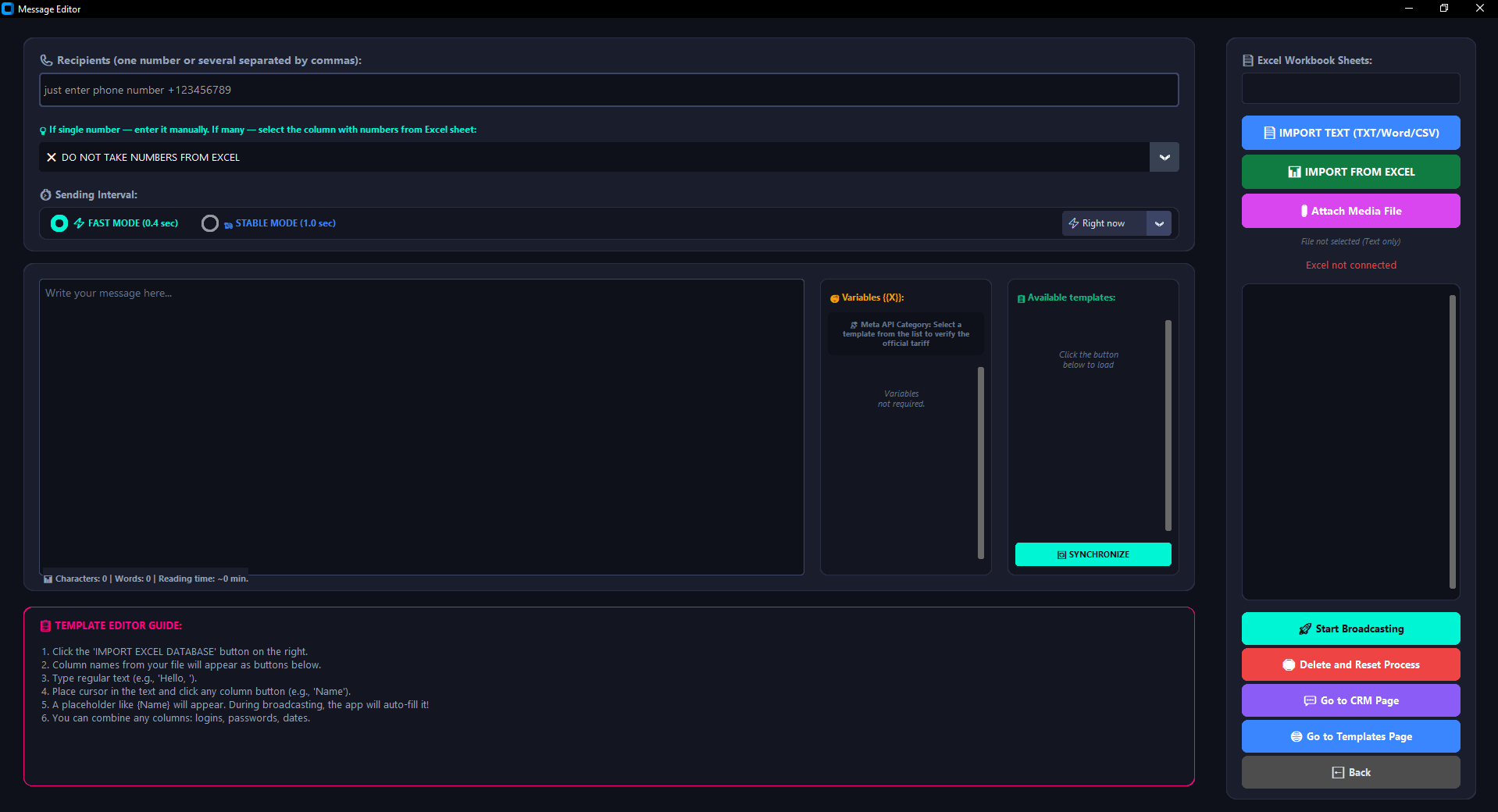
- Handling File Attachments: Yes, media file deliveries are supported natively. By clicking the "📎 Attach Media Element" option, you can bind images (.png, .jpg, .jpeg), official documents (.pdf, .docx, .xlsx, .txt), or audio recordings in .ogg formats. The software seamlessly uploads the targeted file asset onto Meta API cloud media relays, merges it with your copy layout, and routes the full data pack to the destination number.
7.4. Is it possible to auto-load text layouts from external documents straight into the app editor?
- Importing Ready-made Copy Blocks: Yes. To eliminate manual typing for heavy messages, click the blue "📄 IMPORT TEXT BLOCK (TXT/Word/CSV)" button and map your file. MultiSend Pro immediately identifies encoding structures, extracts copy data from .txt, .docx, or .csv formats, and injects the output block straight into your editor panel workspace.
7.5. What is the correct operational workflow when broadcasting inside the "Compose Custom Message" module?
- Step-by-Step Delivery Setup: Input your copy strings into the text canvas area or import them from a local file. Select key strings and map rich formatting styles (bold text markers, italics, monospaced font options) using the dashboard toolbar asset.
- Single Dispatches: If routing a single message, enter the phone details manually inside the header text row matching global dialing rules.
- Bulk Broadcast Campaigns: If deploying bulk zero-cost campaigns to leads active over the last 24–72 hours, upload your filtered Excel directory exported from the CRM panel, specify your target recipient phone column title, bind optional media, and press "🚀 Launch Custom Campaign".
Privacy Policy
Privacy Policy for MultiSend Pro
Last Updated: September 26, 2026
- This Privacy Policy describes how the MultiSend Pro software ("Software", "We", "Us") processes, collects, and protects information when the User ("You", "User") interacts with the application.
1. Collection and Use of Personal Data
- Local Storage: MultiSend Pro is engineered strictly as a local software client. All your data assets (contact lists, message texts, dispatch records, and reports) reside strictly on your personal computer or local server environment.
- No Centralized Collection: We do not collect, transmit, or harvest your personal records, mobile directories, or communication logs onto any external remote tracking platforms.
- Authorization Key Data: To operate server integrations, the Software processes exclusively those security tokens and settings fields that the User maps manually. This data is applied solely to run direct connections and is never routed back to the developer.
2. Interaction with Third-Party Infrastructure (Meta / WhatsApp)
- The Software delivers a graphical automation shell designed to optimize corporate connection layouts.
- By deploying the Software to communicate with third-party networks (such as core assets owned by Meta), you explicitly agree that the application operates fully within the framework of approved rules and technical constraints managed by those ecosystems.
- The Software possesses zero access to your sensitive private credentials, accounts passwords, or billing cards parameters tied onto external platforms.
3. Data Transfers to External Entities
- We never trade, exchange, or deliver any datasets relating to our Users to third-party commercial brokers or external groups.
- Because data streams run strictly inside the User's local machine environment, remote leaks or server breaches from our development endpoints are structurally impossible.
4. Information Safety Measures
- The User assumes individual ownership and full accountability for the endpoints machine safety, local database backups, and the preservation of API access keys.
- We strongly urge administrators to set up robust native operating system storage encryption protocols and block unapproved physical access to computers running the Software.
5. Amendments to this Privacy Policy
- We preserve full operational rights to update this Privacy Statement dynamically as future application upgrades ship to production.
- The most up-to-date version is continuously hosted on the Software's official landing properties.
Official Meta Cloud API Tariffs (2026)
💡 Essential Expert Additions and Life Hacks
- New "Live" Reply Rules: In 2026, any standard free-form text messages from managers (not templates) within the 24-hour window are billed at the Utility category rate. The monthly cap of 1,000 free inbound conversation sessions per number remains fully active.
- Double Charging Protection: If you dispatch a Utility template (receipt) to a customer, and 5 minutes later route a Marketing layout (promo offer) into the exact same chat, Meta will trigger two parallel sessions and charge for both independently.
- Hidden Banking Conversions: WABA balances are always computed in USD ($) or EUR (€). To avoid transaction losses due to double currency conversion by your local bank (up to 2–5%), always link a currency-matching (USD) card to your Meta billing account profile.
| Country (Code) | Marketing (Rate) | Utility (Rate) |
|---|---|---|
| Australia (+61) | $0.0380 | $0.0070 |
| Azerbaijan (+994) | $0.0860 | $0.0212 |
| Argentina (+54) | $0.0618 | $0.0260 |
| Bangladesh (+880) | $0.0732 | $0.0037 |
| Belgium (+32) | $0.0592 | $0.0171 |
| Brazil (+55) | $0.0625 | $0.0068 |
| United Kingdom (+44) | $0.0635 | $0.0220 |
| Hungary (+36) | $0.0860 | $0.0350 |
| Germany (+49) | $0.1365 | $0.0550 |
| Hong Kong (+852) | $0.0732 | $0.0260 |
| Georgia (+995) | $0.0340 | $0.0080 |
| Denmark (+45) | $0.0592 | $0.0171 |
| Egypt (+20) | $0.0644 | $0.0036 |
| Iraq (+964) | $0.0341 | $0.0079 |
| Israel (+972) | $0.0353 | $0.0053 |
| India (+91) | $0.0118 | $0.0014 |
| Indonesia (+62) | $0.0411 | $0.0250 |
| Spain (+34) | $0.0707 | $0.0200 |
| Italy (+39) | $0.0795 | $0.0300 |
| Kazakhstan (+7) | $0.0604 | $0.0180 |
| Qatar (+974) | $0.0341 | $0.0120 |
| Colombia (+57) | $0.0125 | $0.0008 |
| Kuwait (+965) | $0.0792 | $0.0440 |
| Malaysia (+60) | $0.0860 | $0.0140 |
| Morocco (+212) | $0.0414 | $0.0230 |
| Mexico (+52) | $0.0397 | $0.0085 |
| Nepal (+977) | $0.0732 | $0.0034 |
| Nigeria (+234) | $0.0516 | $0.0067 |
| Netherlands (+31) | $0.1597 | $0.0500 |
| Norway (+47) | $0.0592 | $0.0171 |
| Oman (+968) | $0.0341 | $0.0247 |
| Pakistan (+92) | $0.0473 | $0.0150 |
| Poland (+48) | $0.0366 | $0.0122 |
| Portugal (+351) | $0.0592 | $0.0171 |
| Russia (+7) | $0.0802 | $0.0400 |
| Romania (+40) | $0.0860 | $0.0290 |
| Saudi Arabia (+966) | $0.0576 | $0.0107 |
| Singapore (+65) | $0.0732 | $0.0160 |
| USA and Canada (+1) | $0.0250 | $0.0034 |
| Turkey (+90) | $0.0109 | $0.0009 |
| UAE (+971) | $0.0576 | $0.0157 |
| Uzbekistan (+998) | $0.0860 | $0.0212 |
| Ukraine (+380) | $0.0860 | $0.0298 |
| France (+33) | $0.0859 | $0.0300 |
| Sweden (+46) | $0.0592 | $0.0171 |
| Sri Lanka (+94) | $0.0732 | $0.0020 |
| Asia-Pacific Region (rest) | $0.0842 | $0.0113 |
| Western Europe (rest) | $0.0592 | $0.0171 |
| Latin America (rest) | $0.0740 | $0.0113 |
| Central and Eastern Europe (rest) | $0.0860 | $0.0212 |
Meta Encyclopedia & Help with WABA API
Chapter 5: Billing Math and Sessions (Meta Hidden Algorithms)
The commercial model of the WhatsApp Business Platform operates by billing conversation sessions, which fundamentally separates it from traditional SMS gateways. Charges apply not for individual messages, but for opening a fixed 24-hour time frame (customer service window). MultiSend Pro interacts with this infrastructure via data packages. Understanding the mathematical session calculation rules allows you to optimize expenditures tightly.
1. Logic of 24-Hour Conversation Window Calculations
An official session is a continuous time block lasting exactly 24 hours (86,400 seconds). The countdown starts from the exact second an outbound message is successfully delivered to the destination user device (logging a delivered status in software streams). If a device is powered off, the message waits on Meta servers, and the session billing timeline won't trigger until physical delivery completes. Within an active session, a business can route an unlimited volume of messages (including attachments, images, PDF files), and this incurs zero extra charges, provided the traffic strictly matches the opened category profile.
2. Business-Initiated vs User-Initiated Conversation Streams
Meta classifies billing frameworks into two distinct interaction categories depending on the starting instigator:
- Business-Initiated Conversations: Triggered when a company writes first to a contact with whom no active session exists. Can only be initiated via pre-approved message templates. Session costs are fixed by country code and bound to specific categories (Marketing, Utility, or Authentication).
- User-Initiated Conversations: Triggered when a customer writes first. Scribing responses via MultiSend Pro opens an inbound session, which is charged at a significantly lower rate than outgoing advertising tiers.
3. Hidden Algorithms of Concurrent Overlapping Tariffs
A major financial pitfall is the parallel overlapping of distinct category sessions within the same 24 hours. Categories (Marketing, Utility) possess isolated billing metrics. If a cheap Utility template (invoice) is sent at 10:00, and a Marketing layout (sale coupon) follows at 14:00, Meta applies a parallel overlap: the Utility session remains active until 10:00 next day, while a separate Marketing session is initialized at 14:00, charging the full advertisement rate.
4. Rate Cards Geography, Free Tiers, and 72-Hour Ad Windows
Conversation costs rely strictly on the recipient's phone Country Code, completely disregarding physical roaming tracking or your company's registration location. Broadcasting to India (+91) handles different rates than routing to Europe. Voice messages follow standard inbound windows but require verified media layouts if sent as business-initiated campaigns.
Crucial Cost-Saving Loopholes: Meta grants a Free Tier of 1,000 user-initiated conversation sessions per month for each WABA account. Furthermore, if a customer initiates a dialogue via a "Click-to-WhatsApp" targeted ad button on Instagram or Facebook, Meta opens a giant 72-hour completely free communication loop, allowing you to route any templates or documents without a single cent deducted from your balance.
5. Automated Rounding and Local Currency Conversion Overdrafts
All internal financial calculations on Meta Cloud API relays are processed matching the standard UTC (Greenwich) timeline grid. Statement updates stream into your billing manager workspace with a structural latency of 15 to 60 minutes. If your attached banking card currency (USD/EUR) conflicts with the local currency of the recipient's Rate Card, Meta forces an automated conversion loop based on financial market closing values from the preceding day. In transaction logs, individual session cost roundings are calculated down to four decimal places (e.g., $0.0074). During massive broadcast campaigns targeting tens of thousands of lines, these micro-roundings compound rapidly. Therefore, your balance must maintain a technical safety buffer of 5-10% to prevent sudden automated card declines and gateway suspensions.
6. Financial Log Audits and Disputed Charges Resolution Protocol
When running high-volume communication streams, an internal billing conflict known as a Pricing Structure Bug may occasionally record duplicate charges for the exact same conversation category within a single 24-hour window. To secure your budget, download a granular transaction report in CSV format from your WhatsApp Manager, verify the precise session timestamp attributes against the local delivery database logs of your MultiSend Pro software complex, and locate duplicate Message IDs. If anomalies are identified, initialize a technical support ticket under the "Billing and Invoices" segment in your Meta Business Support workspace. Manual human re-evaluation takes 7 to 14 business days, and upon confirmation, the disputed funds are credited back to your corporate account balance.
7. Critical Financial Verification Check-List Before Running a Campaign
- Card Gateway State: Linked payment card is active, international e-commerce processing is unlocked, and daily spending ceilings are set with a buffer.
- Prepaid Credit Validity: The remaining balance on your WABA account holds a positive margin corresponding to the targeted Country Codes Rate Cards.
- Spend Caps Auditing: The account status section confirms zero active restrictions on automated daily operational expenditures.
- Template Classification Control: Invoice structures are locked under Utility while promotions match Marketing, completely mitigating risks of forced tariff modifications by Meta's AI algorithms.